Photo Guide

How to Choose the Perfect Photo for Your Portrait

A great portrait starts with a great photo. Here's everything you need to know to get stunning results every time.

Upload Your Photo Free
Pug photo transformed into a custom Perkie Print portrait
Phone photos work No pro camera needed

Four Things That Matter

If your photo checks these boxes, it'll make a beautiful portrait.

Sharp & Clear

Zoom in on the face. If it stays crisp, you're golden.

Face Forward

Head, eyes, ears, and shoulders. No need for a full body.

Good Lighting

Natural light or soft indoor light. No flash, no harsh shadows.

Phone Photos Work

No pro camera needed. Some of our best portraits came from casual phone shots.

Six Tips for the Best Results

Each tip includes a side-by-side comparison so you can see exactly what works and what to avoid.

Blurry, grainy pet photo to avoid for portraits Avoid
Sharp, clear golden retriever photo ideal for pet portraits Ideal
1

Zoom In for Sharp Detail

Pinch to zoom on your pet's face before uploading. If the eyes, nose, and fur stay crisp, you have a great candidate. If it gets grainy or soft, try another photo. Original files from your camera roll always work better than screenshots or heavily compressed images.

Full body pet photo too far away for a custom portrait Avoid
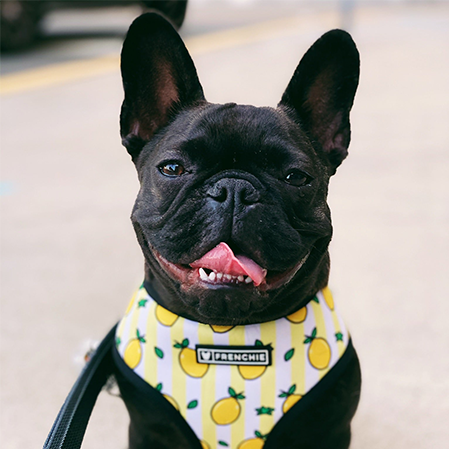
French bulldog head and shoulders close-up ideal for pet portrait Ideal
2

Frame the Face, Not the Whole Body

The best photos show your pet's head, shoulders, eyes, and ears. All four help create a portrait that looks natural and expressive. You don't need a full-body shot. We handle background removal and composition on our end.

Pet photo with harsh lighting and flash to avoid for portraits Avoid
Pet photo with soft natural lighting ideal for custom portrait Ideal
3

Find the Right Light

Soft, diffused lighting is the most flattering. Natural light from a window or open shade produces even tones and preserves fur texture and eye detail. If you shoot outdoors, cloudy days or shaded areas work best. Avoid direct flash, which flattens features and creates red-eye.

Ready to try? Upload your photo free

See your pet as a portrait in under 30 seconds

Dog action shot with motion blur to avoid for portraits Avoid
Calm relaxed Bernese mountain dog ideal for custom pet portrait Ideal
4

Catch Them Calm

A relaxed, natural expression makes the most striking portrait. Action shots, mid-bark, and tongue-out photos are fun but they don't translate well to artwork. Try calling your pet's name softly, or catch them during a quiet moment.

Pet photo with messy background - background doesn't matter for portraits Avoid
Pet portrait with background cleanly removed Ideal
5

The Background Doesn't Matter

Don't worry about what's behind your pet. Messy room, backyard, car seat, it's all fine. We remove the background entirely. As long as your pet's face is clear and well-lit, the surroundings don't matter at all.

Blurry group photo of multiple pets to avoid for portraits Avoid
Individual clear photos of each pet combined into multi-pet portrait Ideal
6

Multiple Pets? Separate Photos Work Best

If you want a multi-pet portrait, you don't need a group photo. Individual photos of each pet work perfectly. We combine them into one composition. Just make sure each photo follows the same guidelines: clear face, good lighting, sharp detail.

Not Sure If Your Photo Works?

Don't stress about finding the perfect shot. Upload what you have and preview how it looks as a portrait instantly. If it doesn't work, you'll know right away and can try a different photo. No commitment, no pressure.

Try It Free

Still Have Questions?

Can I use an old photo or a photo of a pet who has passed?

Absolutely. Any clear photo works, even older ones. Memorial portraits are some of our most meaningful orders. Just make sure the face is visible and the photo isn't too blurry when zoomed in.

What if I'm not sure my photo is good enough?

Upload it and try the free preview. You'll see exactly how it looks as a portrait in seconds. No commitment, no account required. If it doesn't look right, try a different photo.

Do I need a high-resolution image?

The original photo from your phone camera roll is usually perfect. Avoid screenshots, cropped versions from social media, or images that have been compressed multiple times. The more detail in the original, the better the portrait.

Can I upload more than one photo and pick the best result?

Yes! Upload a couple of candidates and preview all of them. Compare the results and go with the one you like best.

What file types and sizes do you accept?

We accept JPG, PNG, HEIC, and WebP files. There's no strict size limit, but photos from your camera roll (not screenshots) give the best results.

Do you accept photos of cats, birds, or other animals?

We do! Dogs and cats are our most popular subjects, but we've made beautiful portraits of rabbits, horses, birds, and more. The same photo tips apply: clear face, good lighting, sharp detail.

Ready to See Your Pet as Art?

Upload your photo and preview every portrait style instantly. If it works, you'll know in seconds.

See Your Free Preview

No account needed · Takes less than 30 seconds · 100% free